Introduction
This article is the fifth part of a 10 part series that I posted as a tutorial for the readers. I will go through step-by-step going over how I created a link shortener app from scratch.
In this post, we will add an API end point to our app and we will cover things such as creating an API endpoint for the user to create a new link, and delete a link, and we will also cover the link redirection in this part.
Adding API to our app
API is short for Application Programming Interface, it is basically a way humans / a program can interact with another program. I will not go into depth of what is an API at this article post, however, I will share the API endpoints that needs to be added for our app.
Before writing our endpoint, lets create a new folder called router and a new file called api.js. This file will contain our API endpoints and the basic format is as follows:
require('dotenv').config();
let db = null

const databaseHandler = require('../packages/db/db');
db = new databaseHandler();
const sqlConf = {
    "host": process.env.MY_SQL_HOST || "CHANGE YOUR HOST IN .env",
    "user": process.env.MY_SQL_USER || "CHANGE YOUR USER IN .env",
    "password": process.env.MY_SQL_PWD || "CHANGE YOUR PW IN .env",
    connectTimeout: 30000,
    charset: 'utf8mb4'
}
db.start(sqlConf, () => {
    console.log("SUCCESS CONNECT TO DB")
})

var express = require('express');
var router = express.Router()


module.exports = router
We added a database handler so that our API can have an interface with our MySQL database.
Return all link of a user
This API will be used in the home page to populate the home page of a user
it can be done by adding the following code:
router.get("/user/links", (req, res) => {
    db.getXbyY("link", "owner_id", req.user.id, (err, result) => {
        res.json({
            error: err,
            result
        })
    })
})
Add a new shortened link
In this snippet, we add an endpoint that allow us to create a new link. Ofcourse, we need to make sure that the link is not yet in the database. It isn’t best practice because normally we would need to define this on the database level
router.post("/link/add", (req, res) => {
    db.getXbyY("link", "source_id", req.body.source_id, (err, result) => {
        if (result.length == 0) {
            let linkToAdd = req.body
            linkToAdd.owner_id = 99999999 // We will set this up as id of user in part 7
            linkToAdd.created_at = getCurrentTime()
            db.add("link", linkToAdd, (err, result) => {
                if (err) {
                    res.redirect("/error")
                } else {
                    res.redirect("/")
                }
            })
        } else {
            res.redirect("/error")
        }
    })
})
Delete a shortened link from db
To delete a shortened link , we need to check whether the user doing it, is the owner of the link, then it can be done by the following.
router.post("/link/delete/:link_id", (req, res) => {
    db.getXbyY("link", "id", req.params.link_id, (err, result) => {
        if (result.length == 1) {
            if (req.user.id == result[0].owner_id) {
                db.remove("link", "id", req.params.link_id, (err, res) => {
                    if (err) {
                        res.redirect("/error")
                    } else {
                        res.redirect("/")
                    }
                })
            } else {
                res.redirect("/error")
            }
        } else {
            res.redirect("/error")
        }
    })
})
Get a random link
Another API endpoint that will be useful is for us to generate an available link.
so before we write the endpoint, lets create a new file in the packages folder called util.js
and write it as the following:
/**
 * https://stackoverflow.com/a/1349426
 * @param {number} length of unique id
 * @returns
 */
function makeId(length) {
    var result = '';
    var characters = 'ABCDEFGHIJKLMNOPQRSTUVWXYZabcdefghijklmnopqrstuvwxyz0123456789';
    var charactersLength = characters.length;
    for (var i = 0; i < length; i++) {
        result += characters.charAt(Math.floor(Math.random() * charactersLength));
    }
    return result;
}
/**
 * convertDate - converting timestamp to string format
 * @param {number} timestamp
 * @returns time in string
 */
function convertDate(timestamp) {
    let k = new Date(timestamp * 1000);
    return `${k.getDate()} ${Month[k.getMonth()]} ${k.getFullYear()}`;
}

/**
 * getCurrentTime - get current time number
 * @returns time in number (seconds)
 */
function getCurrentTime() {
    return Math.round((new Date()) / 1000);
}

module.exports = {
    makeId,
    convertDate,
    getCurrentTime
}
Then the API endpoint can be written this way:
router.get("/free-link", (req, res) => {
    let uniqueId = makeId(6)
    db.getXbyY("link", "id", uniqueId, (err, result) => {
        if (!err) {
            res.json({
                uniqueId,
                inDb: result.length > 0
            })
        } else {
            res.json({
                error: err
            })
        }
    })
})
Finally, we can import the newly created api.js into app.js by adding the code app.use('/api', require("./router/api")).
Add the redirection to app.js
Now that we have our API set up, we need to set up the redirection from app.js. For this we will add the following code to app.js
app.use('/', (req, res, next) => {
    if (req.path.split("/").length == 2
        && ![
            "login", "register", "setting", "error", "logout"
        ].includes(req.path.split("/")[1])) {
        let source_id = req.path.split("/")[1]
        if (source_id !== "") {
            db.getXbyY("link", "source_id", source_id, (err, result) => {
                if (result.length != 0) {
                    res.redirect(result[0].target_url)
                } else {
                    next()
                }
            })
        } else {
            next()
        }
    } else {
        next()
    }
})
Conclusion
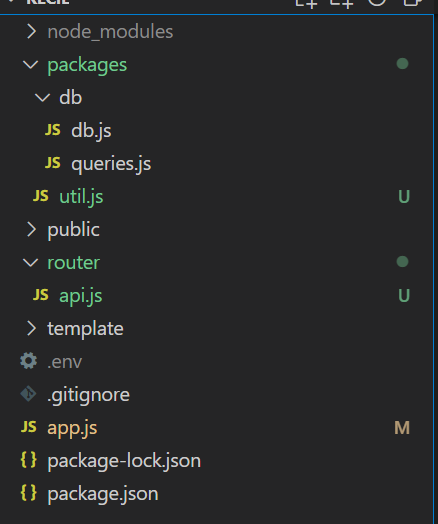
At the end of this part, your folder will look like this
Now that we have set up all of the necesary API endpoints for our product, in the next part we will finally be able to connect our Front-end with our Back-end. If you are stuck with anything, feel free to visit the code in here. Let us now go to the next part 😊