
Motivation
Imagine having the power to extract any data you want from the internet. Every website’s data to be at your fingertips. A very useful power wouldn’t you agree? For those who are not aware, you can learn this power for your self ! this is called Web Scraping. Whether you are a sales team, an engineer, or a researcher, I 100% guarantee that you will wish to know data scraping at some point in yoru life.
Today, I will share you the methodologies that I use when I am given a task to do some data scraping. These methodologies that I will share with you will work to almost every website you can find.
Some assumptions before following this blog:
- I assume you know a little bit about python and some programming concepts
- I assume you are familiar with the basic of how websites work (front-end and back-end)
- knowledge of API would be very useful
Different methods
Without furtherado, we can start with explaining the first method.
Method 1. Programatically scraping using Python
Out of the 3 methods I will share, this method is the one that I can rely on the most, in a sense that if everything else fails, atleast I know I can resort to Python. This is because Python gives us the full control of the scraping process. This includes pausing the scraper when some conditions are met, we can even simulate a login for those website that the data is hidden in login gate.
These are the main tools and their summary of what they do:
- Python : acts as the wrapper and brain of our data scraper. It controls the webdriver that we will use to interact with the website
- A Selenium webdriver : One can look at this as your typical web browser but can be controlled using Python. This allow our python program to interact with the website we want to scrape
- Beautiful Soup : An HTML wrapper library in Python that allow us to extract the data we want to scrape
We can summarize how this works using the following visual:
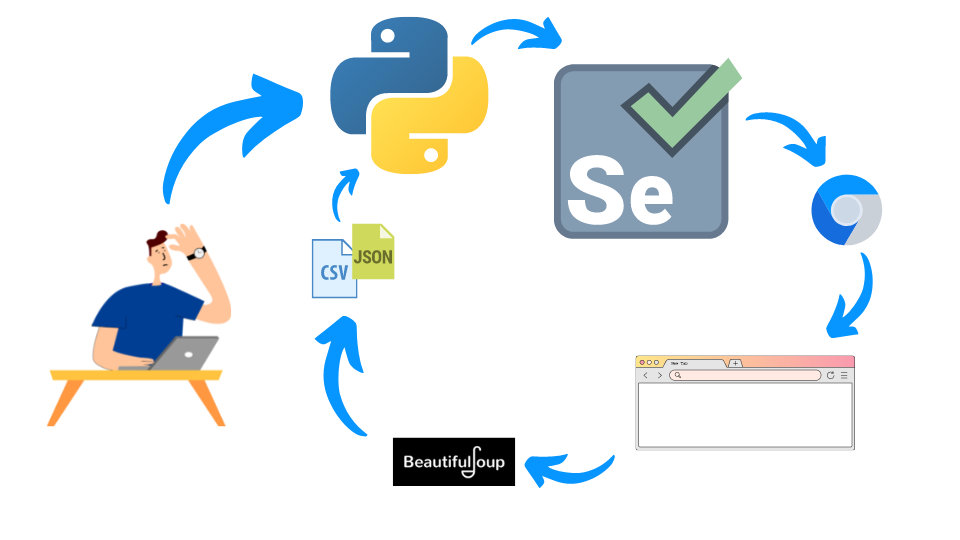
We control Python, which will import the library Selenium which uses a chrome driver to interact with the website we want to scrape. Then we can import the HTML from the driver, to a wrapper library called Beautiful Soup, then we can extract the data we want to a CSV format or JSON.
For the example, we will assume we want to scrape the pokemon dataset from the pokemondb.net website.
import pandas as pd
from bs4 import BeautifulSoup
from selenium import webdriver
import time
from webdriver_manager.chrome import ChromeDriverManager

chrome = ChromeDriverManager()
chrome_options = webdriver.ChromeOptions()
chrome_options.add_argument('--no-sandbox')
chrome_options.add_argument('--disable-dev-shm-usage')
driver = webdriver.Chrome(chrome.install(), chrome_options=chrome_options)
driver.get("https://pokemondb.net/pokedex/all")
time.sleep(3)
soup = BeautifulSoup(driver.page_source)
data = []

headings = [heading.getText().strip() for heading in soup.select("#pokedex thead tr th")]  # extract headings

for row in soup.select("#pokedex tbody tr"):
    try:
        pokemon = {}
        for (i, col) in enumerate(row.select("td")):
            # always useful to strip it to avoid trailing spaces
            pokemon[headings[i]] = col.getText().strip()
            if len(col.select("a.ent-name")) != 0:
                pokemon_link = "https://pokemondb.net" + col.select_one("a.ent-name")["href"]
                # store each pokemon link
                pokemon["link"] = pokemon_link
                # visit each pokemon link
                driver.get(pokemon_link)
                time.sleep(2)
                poke_soup = BeautifulSoup(driver.page_source)
                keys = poke_soup.select("[id*='tab-basic'] div.grid-row:nth-of-type(1) table.vitals-table th")
                values = poke_soup.select("[id*='tab-basic'] div.grid-row:nth-of-type(1) table.vitals-table td")
                # extract data from each pokemon link
                for k, v in zip(keys, values):
                    pokemon[k.getText().strip()] = v.getText().strip()
        data += [
            pokemon
        ]
        # export data after each pokemon is added
        pd.DataFrame.from_records(data).to_csv("./pokemon.csv", index=False)
    except Exception as e:
        print(e)
The code above will result in the follwing data to be extracted (first 4 rows):
| # | Name | link | National № | Type | Species | Height | Weight | Abilities | Local № | EV yield | Catch rate | Base Friendship | Base Exp. | Growth Rate | Egg Groups | Gender | Egg cycles | Total | HP | Attack | Defense | Sp. Atk | Sp. Def | Speed |
|---|---|---|---|---|---|---|---|---|---|---|---|---|---|---|---|---|---|---|---|---|---|---|---|---|
| 001 | Bulbasaur | https://pokemondb.net/pokedex/bulbasaur | 001 | Grass Poison | Seed Pokémon | 0.7 m (2′04″) | 6.9 kg (15.2 lbs) | 1. OvergrowChlorophyll (hidden ability) | 001 (Red/Blue/Yellow)226 (Gold/Silver/Crystal)001 (FireRed/LeafGreen)231 (HeartGold/SoulSilver)080 (X/Y — Central Kalos)001 (Let’s Go Pikachu/Let’s Go Eevee)068 (The Isle of Armor) | 1 Special Attack | 45 (5.9% with PokéBall, full HP) | 50 (normal) | 64 | Medium Slow | Grass, Monster | 87.5% male, 12.5% female | 20 (4,884–5,140 steps) | 318 | 45 | 49 | 49 | 65 | 65 | 45 |
| 002 | Ivysaur | https://pokemondb.net/pokedex/ivysaur | 002 | Grass Poison | Seed Pokémon | 1.0 m (3′03″) | 13.0 kg (28.7 lbs) | 1. OvergrowChlorophyll (hidden ability) | 002 (Red/Blue/Yellow)227 (Gold/Silver/Crystal)002 (FireRed/LeafGreen)232 (HeartGold/SoulSilver)081 (X/Y — Central Kalos)002 (Let’s Go Pikachu/Let’s Go Eevee)069 (The Isle of Armor) | 1 Special Attack, 1 Special Defense | 45 (5.9% with PokéBall, full HP) | 50 (normal) | 142 | Medium Slow | Grass, Monster | 87.5% male, 12.5% female | 20 (4,884–5,140 steps) | 405 | 60 | 62 | 63 | 80 | 80 | 60 |
| 003 | Venusaur | https://pokemondb.net/pokedex/venusaur | 003 | Grass Poison | Seed Pokémon | 2.4 m (7′10″) | 155.5 kg (342.8 lbs) | 1. Thick Fat | 003 (Red/Blue/Yellow)228 (Gold/Silver/Crystal)003 (FireRed/LeafGreen)233 (HeartGold/SoulSilver)082 (X/Y — Central Kalos)003 (Let’s Go Pikachu/Let’s Go Eevee)070 (The Isle of Armor) | 2 Special Attack, 1 Special Defense | 45 (5.9% with PokéBall, full HP) | 50 (normal) | 281 | Medium Slow | Grass, Monster | 87.5% male, 12.5% female | 20 (4,884–5,140 steps) | 525 | 80 | 82 | 83 | 100 | 100 | 80 |
| 003 | Venusaur Mega Venusaur | https://pokemondb.net/pokedex/venusaur | 003 | Grass Poison | Seed Pokémon | 2.4 m (7′10″) | 155.5 kg (342.8 lbs) | 1. Thick Fat | 003 (Red/Blue/Yellow)228 (Gold/Silver/Crystal)003 (FireRed/LeafGreen)233 (HeartGold/SoulSilver)082 (X/Y — Central Kalos)003 (Let’s Go Pikachu/Let’s Go Eevee)070 (The Isle of Armor) | 2 Special Attack, 1 Special Defense | 45 (5.9% with PokéBall, full HP) | 50 (normal) | 281 | Medium Slow | Grass, Monster | 87.5% male, 12.5% female | 20 (4,884–5,140 steps) | 625 | 80 | 100 | 123 | 122 | 120 | 80 |
| 004 | Charmander | https://pokemondb.net/pokedex/charmander | 004 | Fire | Lizard Pokémon | 0.6 m (2′00″) | 8.5 kg (18.7 lbs) | 1. BlazeSolar Power (hidden ability) | 004 (Red/Blue/Yellow)229 (Gold/Silver/Crystal)004 (FireRed/LeafGreen)234 (HeartGold/SoulSilver)083 (X/Y — Central Kalos)004 (Let’s Go Pikachu/Let’s Go Eevee)378 (Sword/Shield) | 1 Speed | 45 (5.9% with PokéBall, full HP) | 50 (normal) | 62 | Medium Slow | Dragon, Monster | 87.5% male, 12.5% female | 20 (4,884–5,140 steps) | 309 | 39 | 52 | 43 | 60 | 50 | 65 |
As mentioned before, thanks to Python we can actually take this one step further by going to each link of the pokemon and extract all the data in each of the pokemon individual links where we extracted their base stats, Type, Species, Height, etc.
Method 2. On-site data scraping
With the second method, it is useful to recall a little bit about how websites work. In any website, there are 2 sides, backend, and frontend. For our purposes, it is only important to keep in mind that the website has a server (which is called the back-end side), this contains website configurations, database, and the backend will serve some files / data to their users and this side is called the front-end. In other words, as a user, we have full control over the HTML files that was sent to us through our browsers. Another important thing is that our browsers runs javascript by default, so in other words, any data you see in the HTML, you can extract with a little knowledge of Javascript.
Lets take the same website for example.
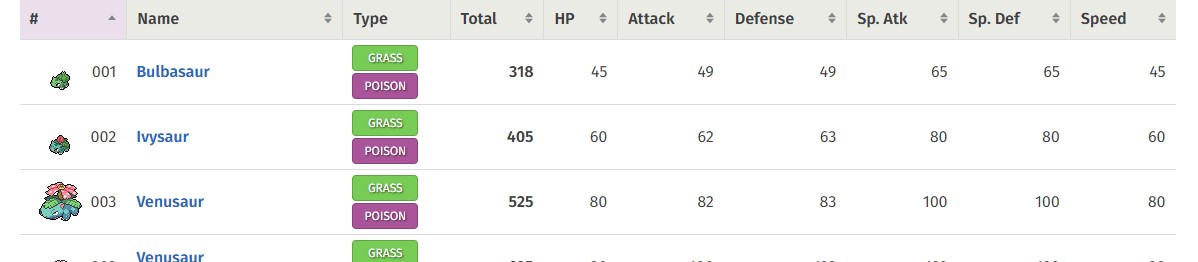
the data you see above, is simply an html in the browser, so you can run a java script that extract these information by opening developer console by pressing ctrl + shift + i to open developer console, and go to console. Then by runnning the following code, you will extract the data in a JSON format.
[
    {
        "name": "Bulbasaur",
        "type": "GRASS\nPOISON",
        "total": "318",
        "hp": "45",
        "attack": "49",
        "defense": "49"
    },
    {
        "name": "Ivysaur",
        "type": "GRASS\nPOISON",
        "total": "405",
        "hp": "60",
        "attack": "62",
        "defense": "63"
    },
    {
        "name": "Venusaur",
        "type": "GRASS\nPOISON",
        "total": "525",
        "hp": "80",
        "attack": "82",
        "defense": "83"
    },
    {
        "name": "Venusaur\nMega Venusaur",
        "type": "GRASS\nPOISON",
        "total": "625",
        "hp": "80",
        "attack": "100",
        "defense": "123"
    },
    .
    .
    .
Method 3. Reverse engineer the website
Finally, we will talk about the last method I use to do my data scraping. It is to reverse engineer their website, in other words, understand how websites work starting from their authentication method (when applicable) in the network level, such what are their Request parameters and recreate the request with a programming language such as Python. This method rarely works, but when it does, you have basically cracked the website and able to scrape the website’s data in the most efficient way, in the case of webapps, it allows you to create automations with interacting directly with their internal API.
Doing this is normally against their terms & conditions and doing so is at your own risk
I can provide an example of scraping with this method, however the websites name will be hidden. for simplicity, lets assume we call this website aaa.bbb.
Upon going to a certain link that contains the data we want, we can go to the developer console as before and open the network tab.

This tab contains all the request that front-end made to the back-end, and upon analyzing further, there is 1 request that takes much longer than others. This means the file delivered in this request must be significantly large. Ofcourse, when we look into the preview tab, we see that the data delivered is a JSON of all entry in their database (even the non visible ones!)

Tips & tricks
In this section, I will give you some tips and tricks I learnt throughout all my scraping experience.
- Understand CSS Selectors (References). This will allow you to have more versitality on selecting the data you want to scrape from a website.
- Keep a checkpoint when scraping data. Don’t save your data at the end of your program, but if you can, try do an export the data at every iteration of the page for example, or after adding every data row. This useful incase for whatever reason your program stopped mid way.
- Combine multiple methods. Don’t be locked into 1 method, you have now plenty of tools in your arsenal use as many of them as possible when necessary!
Conclusion
To conclude, I have shared with you the top 3 methods I used for data scraping and based on my experience, I was able to scrape 90% of the website I came across!
I hope this is useful and don’t hesitate to let me know if you have suggestions and ideas of what my next post should be!